

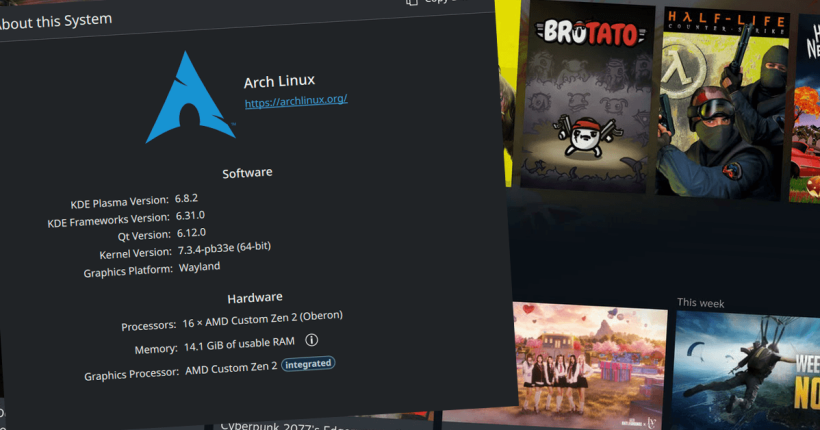
It’s been quite some time since theflow0 released Linux for PS5. Since then, there have been many developments in the PS5 Linux scene, with AI accelerating the pace significantly. Now, we have CachyOS for PS5, by abrocoma.
What is CachyOS?
CachyOS is a rolling-release Arch Linux-based distribution. It has been touted as the distribution for gamers and power users as it prioritises speed and performance. I mean, who doesn’t love speed and performance, right? CachyOS has specific patches in its repo which purportedly increases performance of the system, compared to vanilla Arch Linux.
By the way, elokuba already ported CachyOS for PS4 months ago. Do check it out on your PS4.
CachyOS on PS5
abrocoma’s GitHub repo for CachyOS for PS5 has Claude as a contributor. So, it’s safe to assume much of it’s AI-assisted development. Anyways, with that out of the way, let us look into the features CachyOS brings to PS5.
- SteamOS-style gaming mode (fullscreen).
- Support for upto 1440p at 144Hz (customisable).
- HDR, AMD FreeSync, etc.
- Kernel version – 7.3.4.
Now, let us look into the setup part.
Install and setup CachyOS on PS5
Requirements
- A supported Jailbroken PS5 (any from the list below as listed on the PS5 Linux GitHub repo):-
- PS5 Phat and Slim
- 3.00, 3.10, 3.20, 3.21 without M.2 support
- 4.00, 4.02, 4.03, 4.50, 4.51 with M.2 support
- 5.00, 5.02, 5.10, 5.50 with M.2 support
- 6.00, 6.02, 6.50 with M.2 support
- 7.00, 7.01, 7.20, 7.40, 7.60, 7.61 with M.2 support
- 11.00, 11.20, 11.40, 11.60 with M.2 support
- 12.00, 12.02, 12.20, 12.40, 12.60, 12.70 with M.2 support
- 13.00, 13.20, 13.40, 13.42, 13.60 with M.2 support
- PS5 Pro
- 11.00, 11.20, 11.40, 11.60 with M.2 support
- 12.00, 12.02, 12.20, 12.40, 12.60, 12.70 with M.2 support
- 13.00, 13.20, 13.40, 13.42, 13.60 with M.2 support
- 13.00, 13.20, 13.60 with “viola” GPU uCode support
- PS5 Phat and Slim
- BalenaEtcher – Download here.
- Latest CachyOS for PS5 Package – Download here.
- PS5 Linux Loader (Download the one for your version) – Download here.
- External USB SSD.
Step 1. Flash CachyOS for PS5 to External SSD
- Extract CachyOS for PS5 package you downloaded earlier (ends in
img.xz) using 7Zip or another software for your OS. This will generate a .img file. - Open BalenaEtcher, select your External SSD connected to your PC.
- Point it to the extracted .img file and click on Flash.
- Let it complete.
Step 2. Boot CachyOS on PS5
- Connect the flashed external SSD to your PS5’s front USB-C port or one of the rear USB 3.0 ports, not the front non-USB-C port!
- Turn the PS5 on and load the PS5 Linux loader (payload) using your preferred method.
- The monitor turns off, the power light on your PS5 pulses orange. Once it shows a stable orange light, press on the power button and wait for it to boot into CachyOS.
Step 3. Login to CachyOS for PS5
Use the username: steam and password: steam to login and get started!
Customise CachyOS for PS5
abrocoma also provides an easy option to customise certain parts of CachyOS on your PS5.
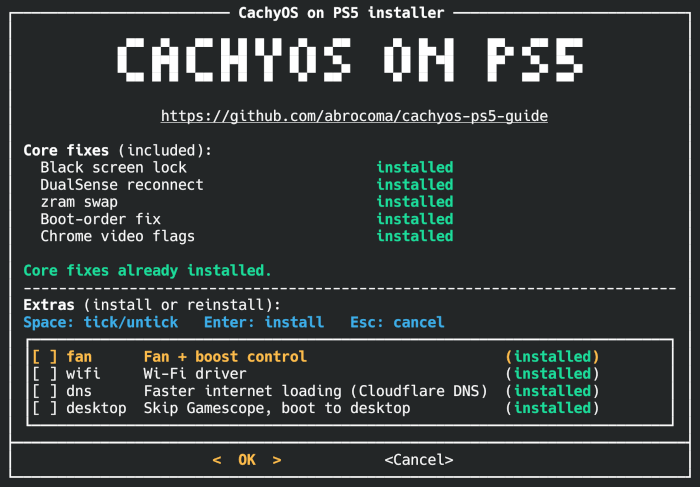
It checks if fixes are installed and also provides additional software including fan and boost control.
How to install CachyOS on PS5 installer?
To install the customiser/installer, follow these steps:-
- Open a terminal in CachyOS.
- Type
git clone https://github.com/abrocoma/PS5-CachyOSand press Enter. - Type
cd PS5-CachyOSand press Enter. - Type
sudo ./install.shand press Enter.
This will install all the additional packages.
Conclusion
The GitHub repo also lists some troubleshooting steps and also lists the various features including HDR, changeable refresh rates, etc. that this OS offers. Do check them out.
Leave a Reply